EnvShield Features & Real-Life Examples
Learn how each EnvShield feature solves real-world problems. Real monorepo scenarios. Real code. Real benefits.
👀 Visual learner? You're in the right place! Scroll through each feature to see real before/after code examples and learn why EnvShield is different.
Ready to get started? Check the Quick Start guide →
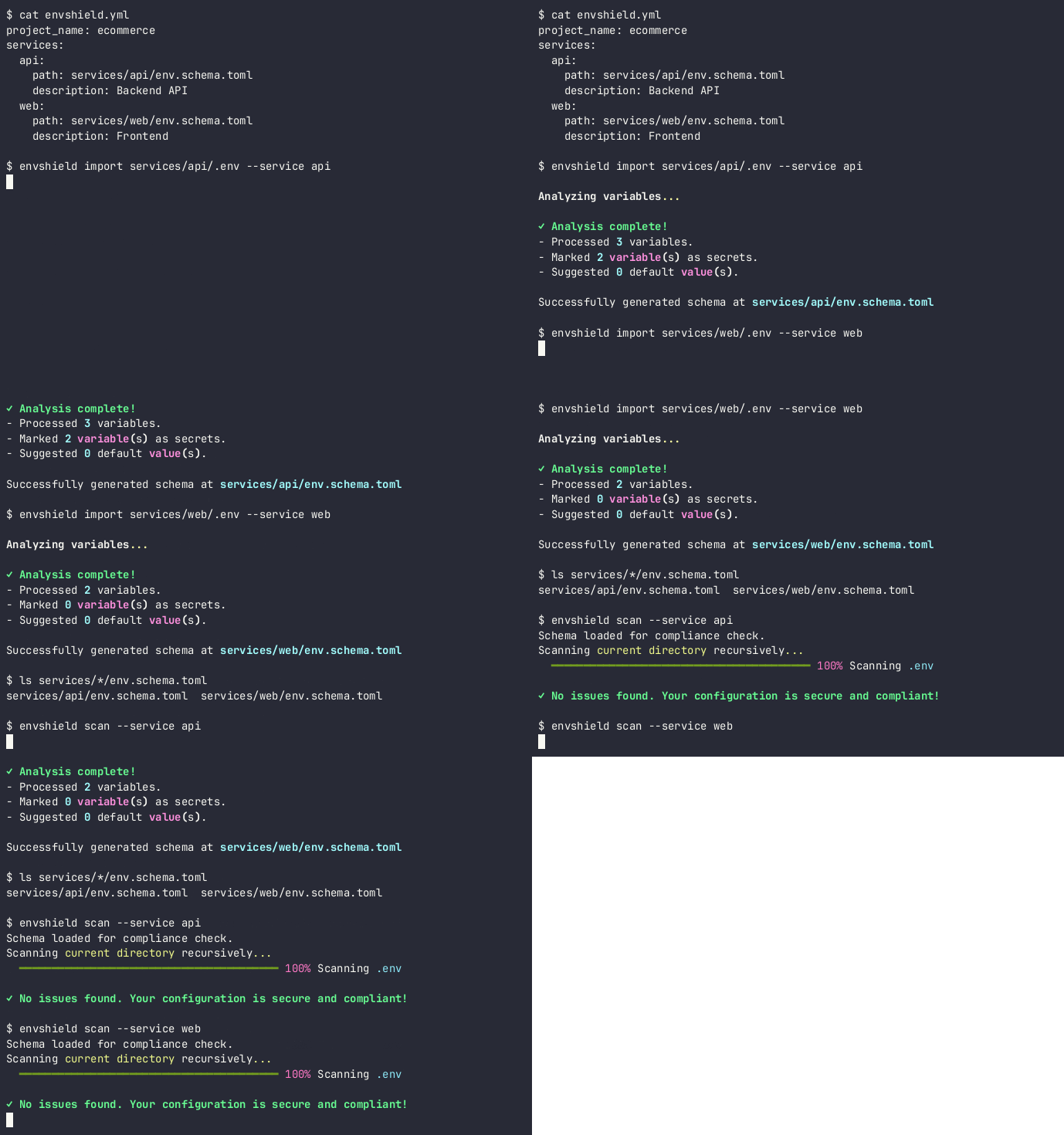
✅ One Schema, All Services
Declare what configuration each service needs in one place. EnvShield is the ONLY tool with native multi-service support.
Gitleaks, dotenvx, Infisical, and direnv all treat configuration as a single-service problem. EnvShield solves for multi-service from the ground up.
Real-Life Example: E-Commerce Monorepo
Your project has API, web, and worker services:
services/
├── api/
│   ├── .env (has DATABASE_URL, missing STRIPE_KEY)
│   └── config.py (uses getenv, untyped)
├── web/
│   ├── .env.example (outdated, has LEGACY_VAR)
│   └── config/.env (fresh, correct)
└── worker/
    └── (no documented env vars at all)

Problem: Is DATABASE_URL the same across all three? Nobody knows.
New dev: "I set up my .env but the API won't start."
         → After 2 hours: missing STRIPE_KEY (only used in API, not documented)
# Single source of truth for all services
cat envshield.yml

project_name: ecommerce-platform
services:
  api:
    path: services/api/env.schema.toml
    description: "Stripe payment API (Flask)"
  web:
    path: services/web/env.schema.toml
    description: "Customer storefront (React)"
  worker:
    path: services/worker/env.schema.toml
    description: "Background jobs (Celery)"

# Import existing configs in seconds
envshield import services/api/.env --service api
envshield import services/web/.env --service web
envshield import services/worker/.env --service worker
What you get:
- ✓ Single source of truth for all services
- ✓ Machine-readable, versionable (in git)
- ✓ No more "is it in this service or that one?"
- ✓ Changes to one service visible to all
See it in action:
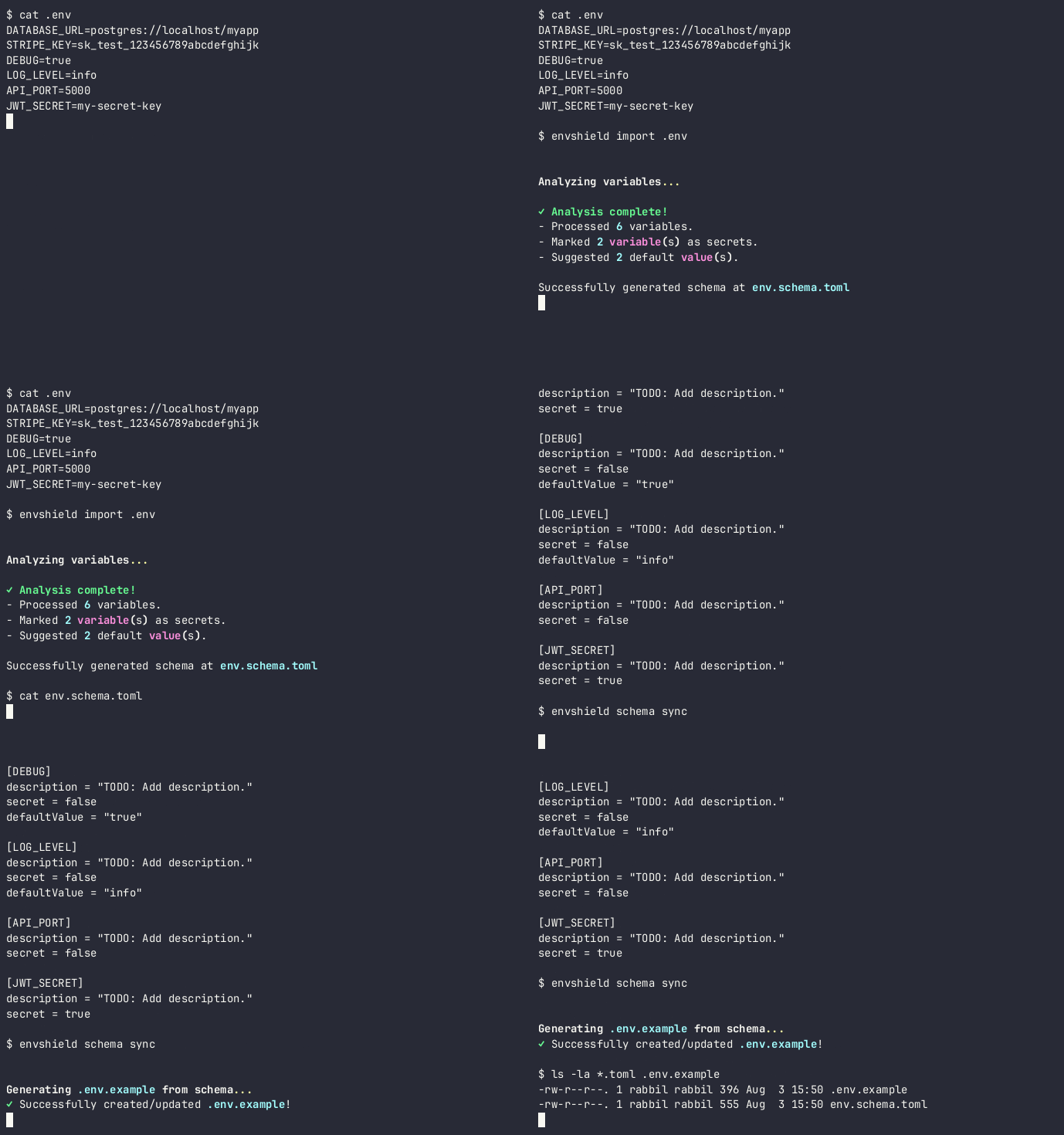
✅ Migrate Existing Projects in Seconds
envshield import reads your existing .env or settings.py and auto-generates 90% of the schema. No manual TOML writing.
Real-Life Example: Django Project with 5 Years of Config
Django settings.py with 200 lines of getenv() calls:
import os

DEBUG = os.getenv('DEBUG', 'False') == 'True'
SECRET_KEY = os.getenv('SECRET_KEY')
ALLOWED_HOSTS = os.getenv('ALLOWED_HOSTS', 'localhost').split(',')
DATABASE_URL = os.getenv('DATABASE_URL')
STRIPE_API_KEY = os.getenv('STRIPE_API_KEY')
# ... 50 more lines like this

# Nobody has time to manually write TOML for all of these
# One command
envshield import settings.py --interactive

# EnvShield reads the file and shows:
# ? Variable: DEBUG
#   Value: False (parsed from code)
#   Detected as: non-secret, boolean
#   Use 'False' as default? (y/n) y
#
# ? Variable: SECRET_KEY
#   Detected as: secret (keyword match: "secret")
#   Confirm as secret? (y/n) y
#
# ... (for all 50+ variables)
#
# ✓ Generated env.schema.toml (52 variables)
# - Marked 18 as secrets
# - Suggested 12 default values
# - Please review and add descriptions!
Result: Schema generated in 30 seconds, ready to review and enhance.
See it in action:
✅ Typed Config Code Generation
Compile schema into real, importable Python (pydantic-settings) or TypeScript (zod) code. EnvShield is the ONLY tool that generates typed, validated config modules from a schema.
Other tools encrypt, scan, or store secrets. Only EnvShield turns your schema into production-ready typed code for Python and TypeScript.
Python: From Untyped Strings to Type-Safe Config
import os

class Config:
    DEBUG = os.getenv('DEBUG', 'false').lower() == 'true'
    DATABASE_URL = os.getenv('DATABASE_URL')
    PORT = int(os.getenv('PORT', '5000'))  # Fails at runtime if not a number
    STRIPE_KEY = os.getenv('STRIPE_KEY')   # Could be None (untyped)
    LOG_LEVEL = os.getenv('LOG_LEVEL', 'INFO')

    # Problems:
    # - STRIPE_KEY could be None at runtime (untyped)
    # - If PORT isn't a number, fails at runtime, not startup
    # - STRIPE_KEY visible in logs if printed
    # - No IDE autocomplete for config keys
from pydantic import Field
from pydantic_settings import BaseSettings
from typing import Literal

class Env(BaseSettings):
    DEBUG: bool = Field(False, description="Enable Flask debug mode")
    DATABASE_URL: str = Field(..., description="PostgreSQL connection string")
    PORT: int = Field(5000, description="Port the API listens on")
    STRIPE_KEY: SecretStr = Field(..., description="Stripe API secret key")
    LOG_LEVEL: Literal['DEBUG', 'INFO', 'WARNING', 'ERROR'] = Field(
        'INFO', description="Log verbosity level"
    )

    class Config:
        env_file = '.env'

env = Env()

# Now in your code:
from config import env

stripe_client = stripe.Client(env.STRIPE_KEY)  # SecretStr (won't log)

# If .env is missing STRIPE_KEY: error on startup, not silent failure
# If .env has PORT="invalid": type validation error on startup
# IDE autocomplete: env. shows all available vars
TypeScript: From Any to Validated Types
const API_URL = process.env.REACT_APP_API_URL;  // string | undefined
const DEBUG = process.env.REACT_APP_DEBUG === 'true';  // string comparison
const MAX_RETRIES = parseInt(process.env.REACT_APP_MAX_RETRIES || '3');  // ??

// Problems: API_URL could be undefined, MAX_RETRIES parsing is fragile
import { z } from 'zod';

const envSchema = z.object({
  REACT_APP_API_URL: z.string().url("API URL must be valid"),
  REACT_APP_DEBUG: z.boolean().default(false),
  REACT_APP_MAX_RETRIES: z.coerce.number().default(3),
});

const env = envSchema.parse(process.env);

export default env;

// Now in your code:
import env from './config';

const response = await fetch(`${env.REACT_APP_API_URL}/api/users`);
// env.REACT_APP_API_URL is typed as string (never undefined)
// REACT_APP_DEBUG is typed as boolean (not string)
// MAX_RETRIES is typed as number (not string or NaN)

// If .env is missing REACT_APP_API_URL: build fails at startup
// If REACT_APP_API_URL isn't a valid URL: build fails at startup
// IDE autocomplete works
See it in action:

✅ Interactive Onboarding Wizard
envshield setup walks new developers through creating .env, knows which vars are secrets, shows descriptions. Free and works offline — no cloud dependency.
Infisical offers onboarding, but only through their cloud dashboard. EnvShield is CLI-first and works completely offline.
Real-Life Example: New Dev's First Day
New dev: "Hey, how do I set up my local env?"
Senior dev: "Copy .env.example to .env, then ask me for the secrets"
New dev: "Which ones are secrets?"
Senior dev: "Uh, the ones that end in _KEY and _SECRET... I think?"
New dev: (spends 30 min sorting it out, gets it wrong)
new-dev$ envshield setup

🛡️  EnvShield Setup
This wizard will help you create your local .env file.

Select service (or 'all'):
> api
  web
  admin

✓ Selected: api

Reading variables from .env.example...

Please provide values for the following variables:

[DATABASE_URL]
PostgreSQL connection string for this service
Enter value (password): •••••••••••••••••••••••••••

[STRIPE_SECRET_KEY]
Stripe API secret for processing payments
Enter value (password): •••••••••••••••••••••••••••

[LOG_LEVEL]
Log verbosity (DEBUG, INFO, WARNING, ERROR)
Enter value: INFO

[REDIS_URL]
Redis connection string for session cache (optional)
Enter value (optional, press Enter to skip):

✓ Successfully created your .env file!
Ready to go. Run: source venv/bin/activate && python app.py
What happened:
- ✓ Prompted for all required variables
- ✓ Secrets prompted as hidden input (passwords)
- ✓ Descriptions shown (what each var is for)
- ✓ Optional variables skipped if not provided
- ✓ No mistakes because it walked through the contract
- ✓ Took 2 minutes, not 30
See it in action:

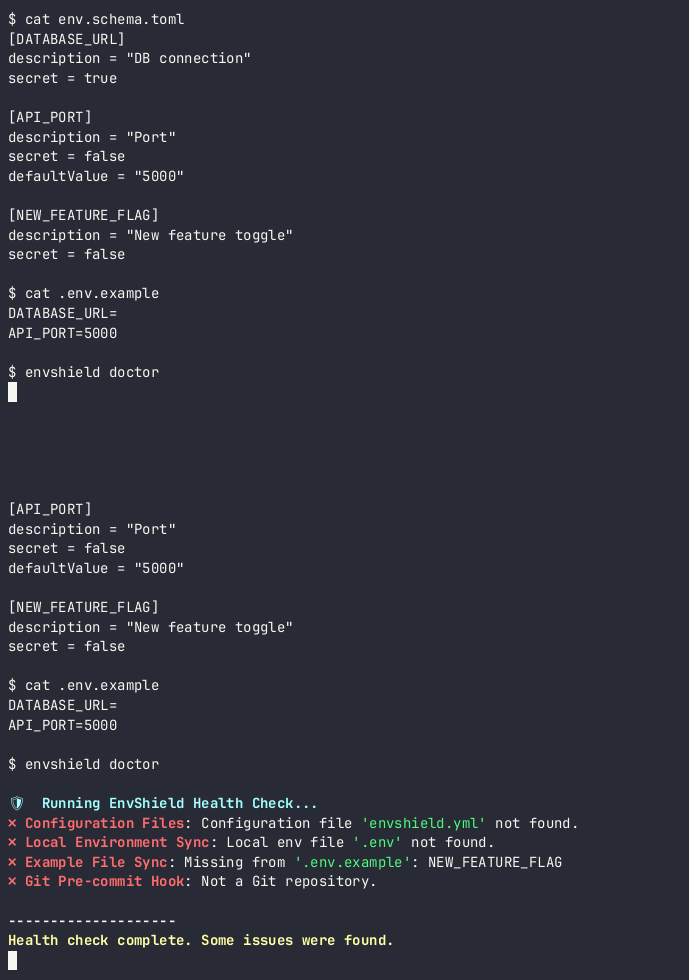
✅ Prevents Configuration Drift
envshield doctor checks if .env.example is in sync with schema, if local .env has all required vars, and more.
Real-Life Example: Caught a Production Bug
Friday afternoon, API service adds new feature:
- Changes require new env var: FEATURE_FLAG_NEW_ORDERS

Dev commits feature code, adds FEATURE_FLAG_NEW_ORDERS to .env

But forgets to update .env.example

Merges to main

Ops deploys to staging
Staging works (ops has .env from production)

Deploys to production
Production deployment: env var missing!
→ Feature silently disabled
→ New orders broken
→ Customers angry 😡
# Dev finishes feature, commits
git add src/orders.py env.schema.toml .env.example
git commit -m "Add new orders feature"

# Pre-commit hook runs
$ envshield scan --staged
✓ No secrets found

# Someone runs doctor before merge
$ envshield doctor --service api
✓ Configuration Files
✓ Local Environment Sync
✗ Example File Sync: .env.example missing FEATURE_FLAG_NEW_ORDERS

  Suggestion: run `envshield schema sync --service api`

# Dev fixes it:
$ envshield schema sync --service api
$ git add .env.example
$ git commit -m "Update .env.example"

# Merge
# Deploy
# Production: all env vars present ✅
See it in action:
✅ Secret Scanning at Commit Time
Pre-commit hook scans staged content (not working-tree files), catching secrets that were committed but later edited out on disk.
Real-Life Example: The Secret That Almost Shipped
Dev writes code with a hardcoded secret:

# app.py
STRIPE_SECRET = "sk_live_ABCDEFGHIJKLMNOPQRSTUVWxyz"  # Oops!

git add app.py
git commit -m "Add payment processing"  # BEFORE this commit, secret still there!

# Then realizes mistake, edits file:
STRIPE_SECRET = os.getenv("STRIPE_SECRET")

# File on disk now looks clean
# But the secret is already staged!

git push
# Secret shipped to production in git history
$ git add app.py
$ git commit -m "Add payment processing"

# Pre-commit hook runs:
$ envshield scan --staged
🚨 DANGER: Found 1 potential secret(s)!

Line 5: STRIPE_SECRET = "sk_live_ABCDEFGHIJKLMNOPQRSTUVWxyz"
Secret Type: Stripe API Key

Commit aborted. Please fix the issues above before committing.

# Dev can't commit the secret to history
# Even though they edited it out on disk ✅
See it in action:

✅ Schema Syncing & Documentation
envshield schema sync regenerates .env.example from the schema. Always keeps docs in sync.
Real-Life Example: Add a New Variable
Dev adds new env var to code but forgets to update .env.example
→ .env.example becomes stale
→ New devs miss the var
→ Production breaks

Or:

Dev changes description of DATABASE_URL in comments
But forgets to update .env.example
→ Two sources of truth
→ Docs rot
# Dev edits schema to add new var:
cat services/api/env.schema.toml

[ANALYTICS_SERVICE_KEY]
description = "API key for Segment analytics tracking"
secret = true

# One command regenerates .env.example from schema:
$ envshield schema sync --service api

# .env.example now includes:
# ANALYTICS_SERVICE_KEY=
What you get:
- ✓ .env.example is always in sync with schema
- ✓ One source of truth (schema)
- ✓ Documentation doesn't rot
- ✓ No manual copy-paste errors
🎯 Why EnvShield is Different
Each of these features exists in other tools, but EnvShield is the ONLY tool that does ALL of them together:
| Feature | EnvShield | Competitors |
|---|---|---|
| Schema-driven configuration | ✅ Unique | ❌ None |
| Multi-service natively | ✅ Unique | ❌ None |
| Typed config generation | ✅ Unique | ❌ None |
| Interactive onboarding | ✅ | ⚠️ Cloud-only |
| Local-first (offline) | ✅ | ⚠️ Some |
| Secret scanning | ✅ | ✅ Gitleaks/TruffleHog |
The bottom line: Gitleaks detects secrets. dotenvx encrypts files. Infisical stores them in the cloud. But only EnvShield treats configuration as a contract, generates typed code, and supports multi-service projects natively.
🚀 The Roadmap: What's Coming
Phase 1 is the free foundation. Phase 2 and 3 bring team collaboration and enterprise features:
Phase 2: The Team Collaborator (Coming Soon)
- 🔄 Environment Profiles: Switch between dev/staging/prod with one command
- 📊 Schema Diffing: See exactly what changed in configuration between environments
- 🤖 Automated Onboarding: Setup command that also runs migrations and scripts
- 👥 Team Collaboration: Securely share secrets with teammates
- 🔌 CI/CD Integration: Validate config before deployment
Phase 3: The Enterprise System (Future)
- ☁️ Cloud Secret Vault: Optional centralized backend for teams (local-first still supported)
- 🔐 Vault Integration: Connect to HashiCorp, AWS Secrets, Azure Key Vault
- 📋 Audit Logs & RBAC: Full compliance trail with role-based access control
- 📏 Policy Engine: Enforce naming conventions and best practices
Ready to dive into the implementation?
Head to the docs for detailed command reference, configuration guides, and roadmap.
View Full Documentation →